You can remove an intake form field from one or more services without necessarily deleting the field from your account.
There are two ways to do this:
- From the Intake Form settings
- From the Service settings
Important: Removing or deleting an intake form field affects previously saved customer intake-form data. The saved response against the customer profile will be removed. However, the intake-form information already captured against an existing booked appointment will remain available with that appointment.
Option 1: Remove the field from Intake Form settings
Quick navigation
Settings → Intake Form → Edit Field → Deselect Service → Update → Save Changes
Step 1: Open Intake Form settings
- Log in to your Appointy admin account.
- Go to Settings.
- Under Customization, open Intake Form.
Step 2: Edit the field
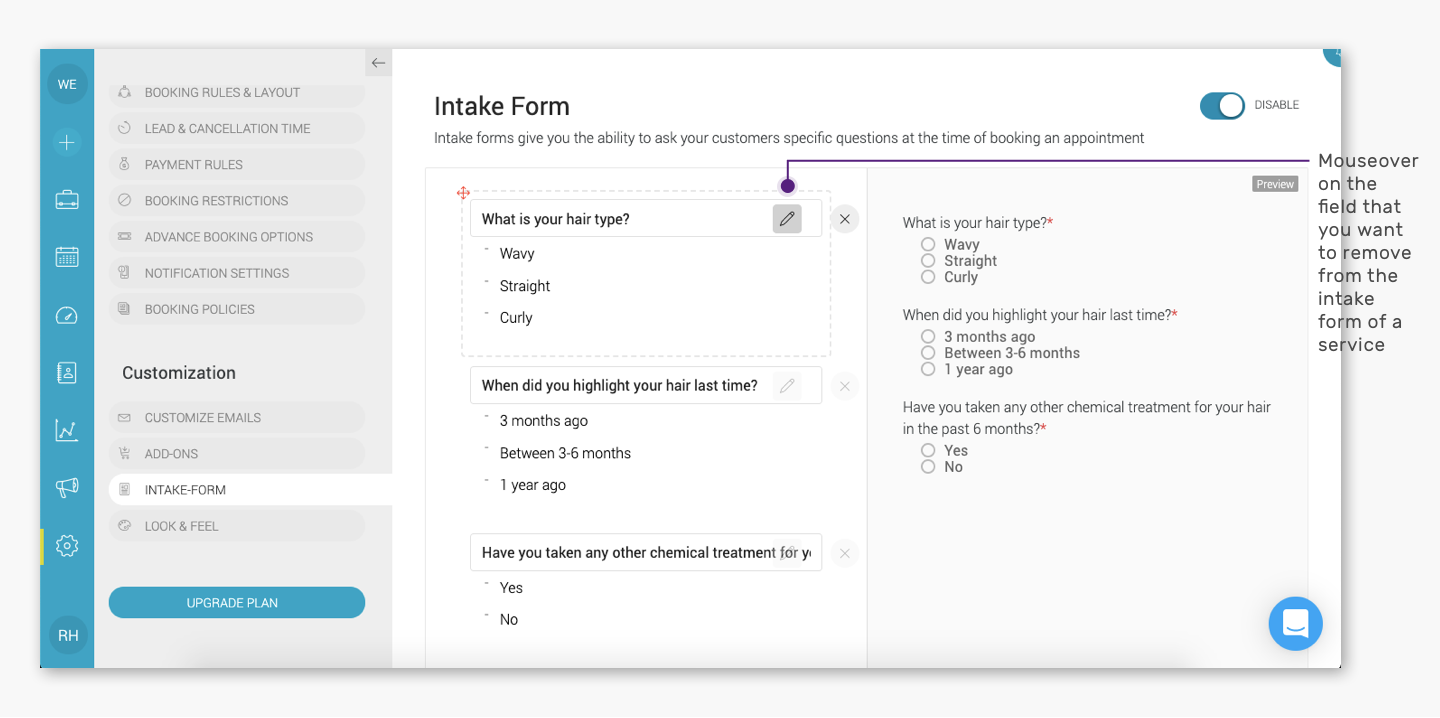
Locate the intake form field you want to remove from a service.
Hover over the field and click the pencil/edit icon.
.
.
Step 3: Deselect the service
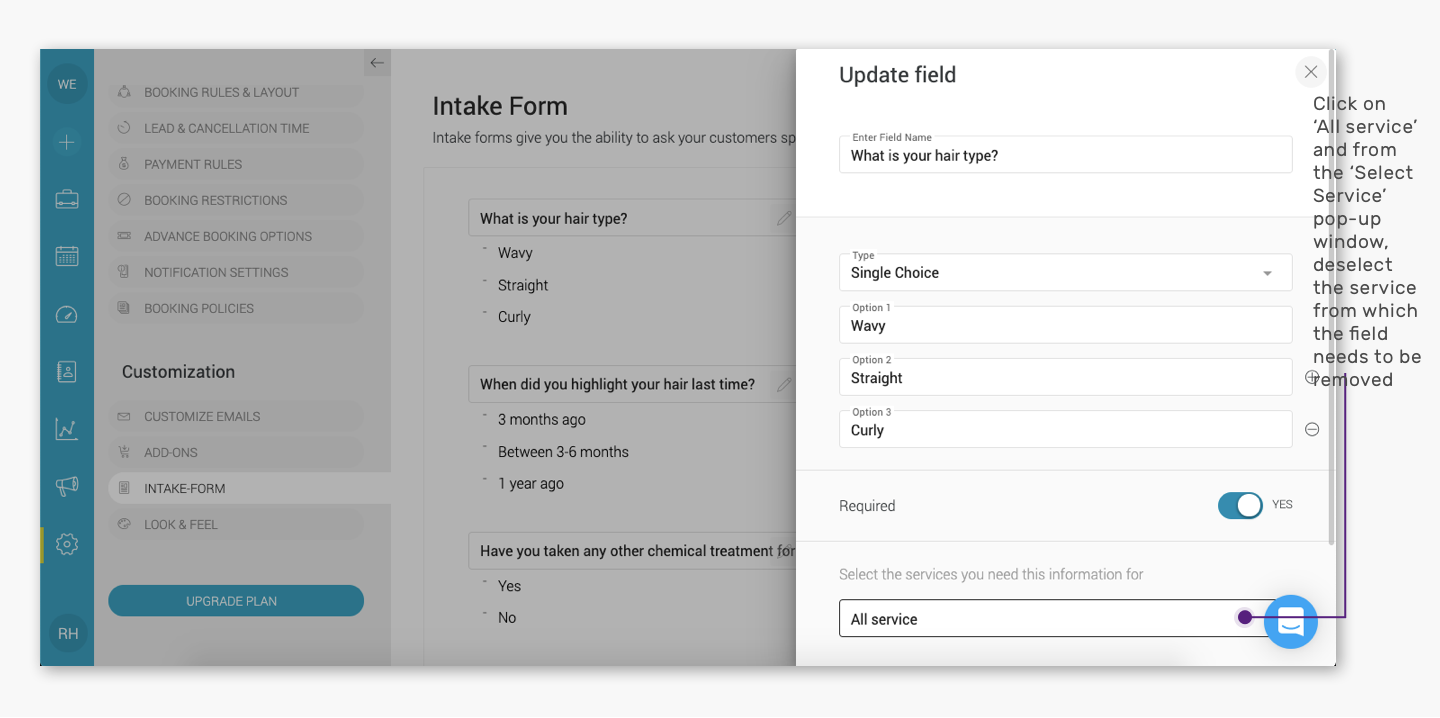
- The Update Field panel will open.
Under the service assignment section, deselect the service or services from which you want to remove this field.
This removes the field only from the selected services
.
Step 4: Save the changes
Click Update, then click Save Changes.
The field will no longer appear in the intake form for the deselected service.
.
Option 2: Remove the field from Service settings
Quick navigation
Settings → Services → Select Service → Intake Form → Edit Field → Deselect Service → Update → Save Changes
Step 1: Open the service
- Log in to your Appointy admin account.
- Go to Settings.
- Open Services.
- Select the service whose intake form you want to update.
Step 2: Open the Intake Form section
Open the Intake Form section for that service.
Locate the field you want to remove and click the pencil/edit icon.
.
.
Step 3: Deselect the service
In the Update Field panel, deselect the service from the field assignment.
.
.
Step 4: Save the changes
Click Update, then click Save Changes.
The field will no longer be shown when customers book that service.
.
Removing a field vs deleting a field
These actions should be treated differently.
Remove the field from a service
Deselecting a service removes that field from the intake form for that particular service.
The field can still remain available for other services to which it is assigned.
Delete the field
Deleting the field removes it from the intake-form setup itself.
This can affect customer-level saved intake-form information, so it should be used carefully.
What happens to previously collected intake-form data?
When an intake form field is removed or deleted:
- The saved intake-form response associated with the customer profile is removed.
- The information already captured against an existing booked appointment is not removed from that appointment.
Example
Suppose you ask:
“Do you have any allergies?”
A customer answers:
“Peanuts”
If that intake form field is later removed:
- The saved answer against the customer's reusable intake-form information will no longer remain there.
- The answer captured with an already-booked appointment will remain associated with that appointment.
This distinction is important before removing or deleting intake-form fields that may contain historical customer information.
When should you remove a field instead of deleting it?
Remove the field from a service when:
- The question is no longer relevant to that service
- The same field is still needed for other services
- Different services need different intake forms
Delete the field only when:
- The field is no longer required anywhere
- You understand the impact on previously saved customer intake-form information
Frequently Asked Questions
Can I remove an intake form field from only one service?
Yes. Edit the field and deselect only the service from which you want to remove it.
Will the field still remain on other services?
Yes, as long as those services remain assigned to that field.
What happens to saved customer answers if I remove the field?
The saved intake-form response associated with the customer profile will be removed.
Will the intake-form answer disappear from an already-booked appointment?
No. Information already captured against an existing booked appointment will remain with that appointment.
Should I delete the field if I only want to remove it from one service?
No. If the field is still required for other services, simply deselect the relevant service instead of deleting the field.
Can I assign the field to the service again later?
Yes. You can edit the field and reselect the service when required.